How do I match a payment to a budget line?
Assign an unmatched payment once, and Bunse matches that merchant automatically from then on.
Updated 1 October 2026
Payments Bunse couldn't match after an import wait on Budget › Transactions, in a card showing how much isn't matched to a budget line. Assigning a merchant matches all of its payments at once, and teaches Bunse to match it automatically next time.
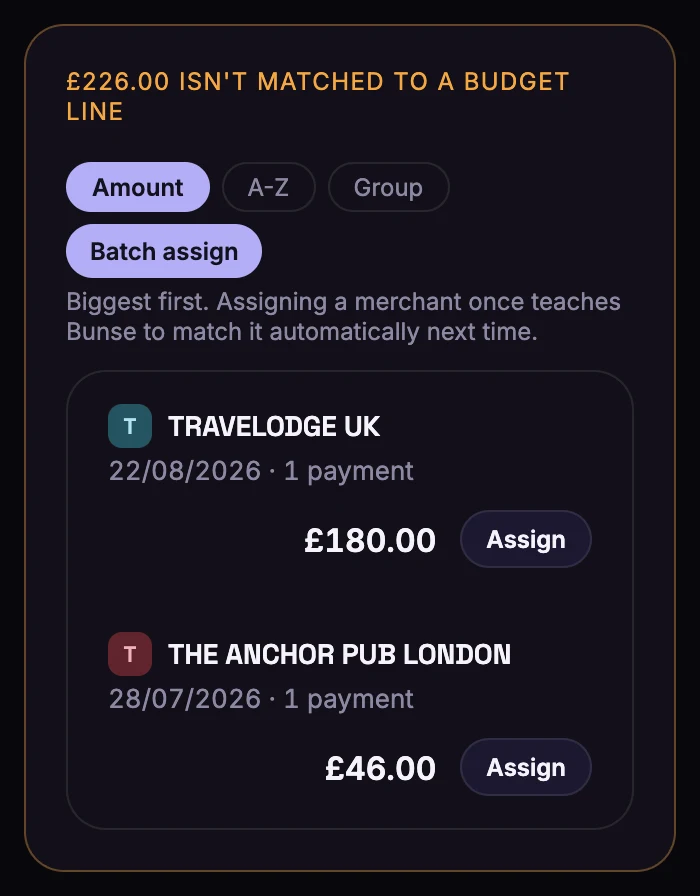
Assign a merchant
- Find the merchant in the list. If Bunse has a good guess, there's an Assign to … button with the line's name: tap it and you're done.
- Otherwise tap Assign (or Other…) and choose where the payments belong:
- Your budget lines, or Miscellaneous for a one-off that doesn't fit anywhere.
- Discretionary spend, such as eating out or clothing: tracked in Insights, but not part of your budget.
- Not budget spending: cash withdrawals and one-off transfers, which stay out of your spending totals.
- Always ignore this merchant, for payments you never want in your budget.
Assign lots at once
With a long list, tap Batch assign. Choose a line in Assigning to:, then tap each merchant that belongs there. Switch to another line whenever you like, and tap Done when you're finished. Pin the lines you use most, so they're one tap away.
Sort by Group to see merchants with similar names together, such as several card payments to the same shop. Assign All sorts a whole group in one go.
Change a payment that's already matched
In the month's list of transactions, tap the × next to the payment to unassign it. It goes back to the unmatched list, where you can assign it again.
A merchant that appears under several slightly different names, like an online shop with an order number in every payment, can be merged into one. See what merchant merges are.