Overview
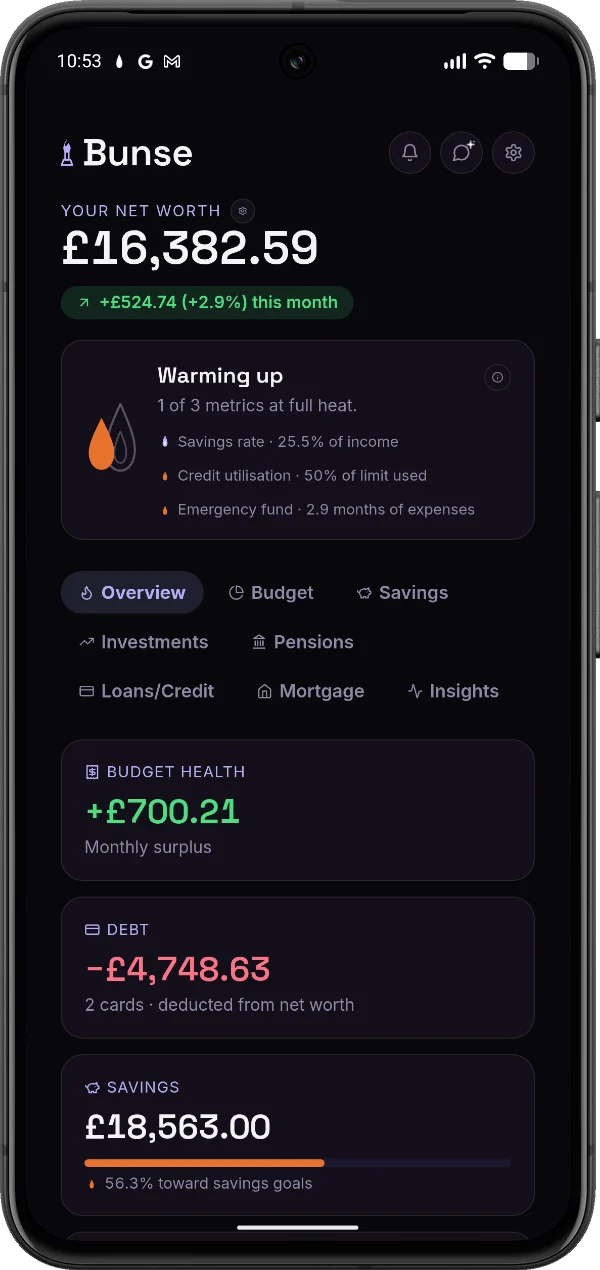
Net worth, transactions and upcoming liabilities — one unified dashboard.
Budget, savings, investments, pensions, loans and mortgage — all in one place, so the spreadsheet finally gets to retire. And it never asks for your bank login.
of UK adults who budget use a spreadsheet — compared with just 9% who use a budgeting app.
Source: YouGov, UK financial outlook 2026of UK consumers don't trust that open banking is safe. Most budgeting apps need a bank connection. Bunse never does.
Source: Finextra, “Majority of Brits don't trust open banking with their data”Mortgage overpayments, 0% deadlines, portfolio gains, deposit goals — tracked properly, on your phone.
Your current account is in one app. Your ISA is in another. The mortgage is on a lender portal you log in to twice a year. The credit card has a 0% deal ending at some point you can't remember.
None of them talk to each other. So you open a spreadsheet, key it all in, and try to work out where you actually stand. That spreadsheet is doing something valuable. It's just doing it badly.
Bunse holds everything — budget, savings, pensions, investments, loans, credit cards, mortgage — and gives you a single net worth figure that accounts for all of it.
Then it does the parts a spreadsheet can't do without an afternoon of formula-wrangling.
Bunse scores the things you actually control — how much you're putting aside, how much of your credit limit you're using, how many months of expenses you've got covered — and turns them into a single flame.
Small and amber when you're getting started. Full heat when everything's where it should be.
Track balance transfers, money transfers and purchases separately, each with its own rate and interest-free deadline.
Bunse shows what's still at 0%, what's started accruing, and warns you before a promo window closes.
Enter an overpayment and see the interest saved, the years cleared early, and the debt curve with and without it.
Log real payments as you go and watch the projection update. Want to try it now? Use the free overpayment calculator.
No Open Banking consent screen, no third-party aggregator, no credentials to hand over. Your accounts, balances and transactions stay on your device — export everything as a file whenever you want.
Got a statement to enter? Import a CSV, QIF or OFX export. The file is read on your phone and never uploaded. How Bunse handles security
Net worth, transactions and upcoming liabilities — one unified dashboard.
Dynamic pie charts. See your true surplus cash at a glance.
Visual goals. Watch your safety net grow over time.
Keep track of your holdings, with live prices from your own market-data API key.
Workplace pensions and SIPPs, with employer contributions tracked separately — watch the free money add up.
Track utilisation and 0% deadlines. Pay down debt efficiently.
From saving the deposit to clearing the last payment.
Spend trends by category and merchant, "wants" tracked separately, and custom groups — every chart drills into the real transactions.
Ask a plain question, get an instant answer. No chat, no AI service — worked out entirely on your device, like everything else.
Everything most people need is free. A Pro plan for advanced features is coming soon.
No card required.
No. Bunse has no Open Banking connection and never asks for your online banking login. You import a statement file you've downloaded from your bank yourself, or enter your figures by hand.
Download your transactions from your bank's website or app as a file (CSV, QIF or OFX) and import it. Bunse reads it on your phone, picks out your regular bills and subscriptions, and builds your budget from them. You can also set everything up by hand.
On your device, and nowhere else. Bunse has no server holding your financial data, so there's no account to break into. It also means we can't recover it for you, so export a backup from Settings now and then. If you lose your phone, restore that backup on your new one.
Yes. Everything in Bunse is free: your budget and statement imports, savings, investments, pensions, loans and credit cards, your mortgage and Insights. There are no adverts, no card details to add and no account to create.
Bunse is coming to iPhone and Android. Until it's in the App Store and Google Play, you can use the web version on any phone and add it to your home screen.
No. Bunse is a tracking tool, not a financial adviser. It shows you figures based on what you enter and never recommends what to buy, sell or hold.
No sign-up, nothing stored.
See how much interest you'd save and how many years you'd clear early.
Try the calculator →Why so many people don't trust open banking, and how to budget properly without it.
Read the guide →Free vs £109/year, and the method it actually takes to replace it.
Compare →What you get free with Bunse vs Emma's £4.99–14.99/month tiers.
Compare →Catching price rises without handing over your bank login.
Compare →Free, in your browser, and it never asks for your bank login.