Read your Insights: Totals, Trend and the planned line
What each Insights tab shows, how the Totals and Trend views differ, and how a category compares with your plan.
Updated 1 October 2026
Insights shows where your money goes, from the statements you've imported. Choose how far back to look with 3 months, 6 months, 12 months or All.
The four tabs
- Overview. Spend over time: everything you spent each month, with discretionary spending shown as a dashed line and cash withdrawals as a grey one. Income vs Expense: each month's income against your spending.
- Categories. Your spending by budget line.
- Merchants. Your spending by shop or company, leaving out fixed commitments like rent and council tax.
- Discretionary. The spending you've tagged as discretionary.
Totals and Trend
Categories, Merchants and Discretionary each have two views:
- Totals shows each item's share of your spending over the months you've chosen. It works from your first month of transactions.
- Trend compares each item's last complete month with its own average over the months before it. Red means more than usual, green less. Months where an item had no spending aren't counted in its average.
Trend needs three months of transactions. Until then, Insights shows Totals.
The current month isn't over yet, so it appears in the charts but not in Trend's comparison. Otherwise every category would look lower than usual partway through a month.
Compare a category with your plan
In Categories › Trend, tap a category to see its own chart. The dashed line is your planned amount for it, and the text above says how many complete months went over.
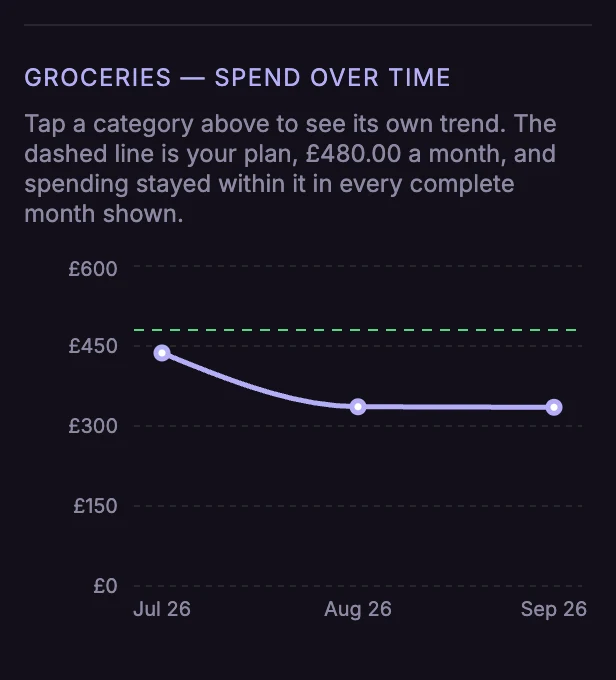
In Totals, each category with a plan shows its last complete month against it, for example "Aug 26: £336.10 of £480.00 planned", in red when it went over.
Groups
Your groups, on the Categories tab, combines categories you think of as one thing into a single trend, such as "Kids" for child maintenance and days out. Groups only change what Insights shows, not your budget.