Set up your mortgage
Track the mortgage you have, or plan one you're expecting, and see what overpaying would save.
Updated 1 October 2026
The Mortgage tab has two views: Repayment, for a mortgage you have or are about to take out, and Deposit, for saving to buy.
Add the mortgage you have
- Open Mortgage › Repayment and tap I have a mortgage.
- Add your current rate deal as a product: its type (Fixed-Rate or Tracker), lender, the mortgage debt remaining when it started, its start date, how many years it lasts, and its interest rate. Bunse works out the end date and the monthly payment.
- Set the mortgage term: the full length of the mortgage, counted from its start date. This sets your Mortgage End Date.
With a product added, Bunse is tracking your mortgage: it estimates today's balance and builds your Payment History from your products. Add a new product each time you remortgage or start a new deal, and tracking carries on from there.
Your first product's start date becomes the mortgage start date that tracking runs from.
Plan a mortgage you're expecting
With no mortgage set up, tap Plan a mortgage to see what one would cost: enter the amount, term and interest rate. Once you have the mortgage, add its rate deal as a product to start tracking it.
See what overpaying would save
In Overpayment Calculation, add any mix of:
- A regular overpayment each month.
- A yearly lump sum, in a month you choose, for as many years as you choose.
- A one-off overpayment, with the date you'll pay it.
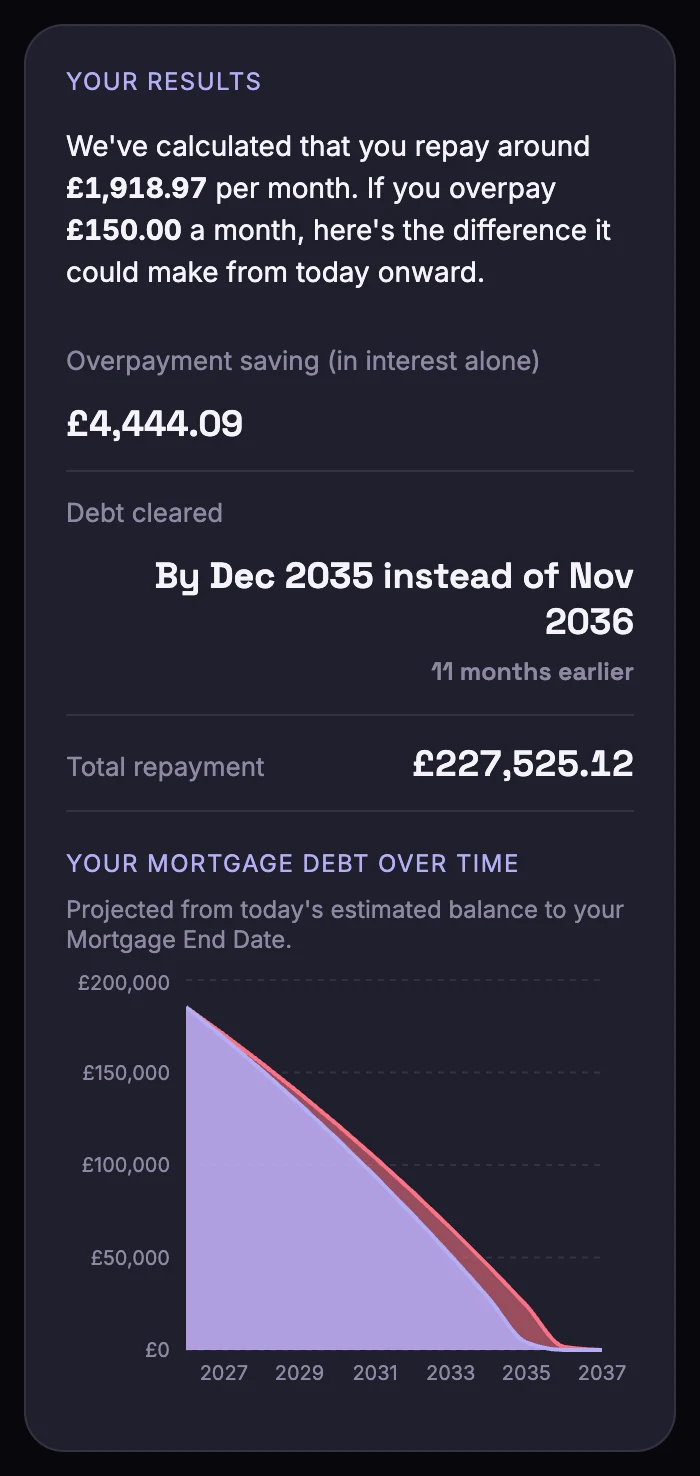
Your Results shows the interest you'd save, when the debt would be cleared compared with not overpaying, and your total repayment, with a chart of the balance over time.
Most lenders let you overpay up to 10% of your balance a year during a fixed or tracker deal without an early repayment charge. Bunse checks your plan against that and tells you if it goes over. Check your own deal's terms, too.
Saving for a deposit
Mortgage › Deposit is for saving to buy:
- Enter a target purchase price and your gross salary. Bunse estimates your borrowing limit at 4.5 times salary, and suggests the deposit you'd need.
- Choose which savings accounts count towards the deposit, the whole balance or a fixed amount of each, including a Lifetime ISA.
- See your progress towards each loan-to-value (LTV) band.
Reminders
On your phone, Bunse can remind you 180, 90 and 30 days before your deal ends, in time to find a new one.